flowchart TB
    W[Windows socket, process,<br/>service & firewall APIs] -->|read-only| C[Collect-Windows.ps1<br/>PowerShell collector]
    C -->|token-authenticated<br/>loopback upload| S[Python server in Docker<br/>explainable review rules]
    S -->|polls every 5s| B[Browser dashboard<br/>HTML / CSS / JS]
Summary
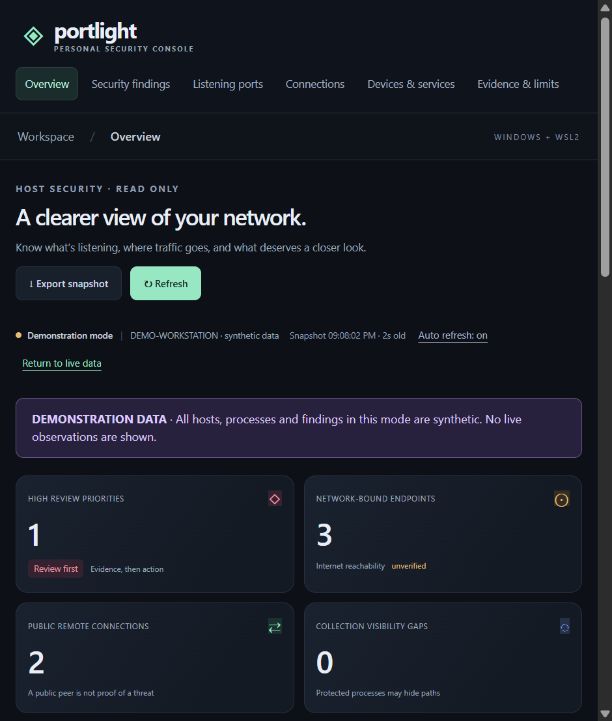
Portlight answers a simple question: what on my computer is listening on the network, where is it talking to, and what deserves a closer look? A Windows PowerShell collector reads sockets, processes, services, and firewall profiles. It uploads a snapshot to a locked-down Docker container, which applies transparent review rules and serves a dashboard at 127.0.0.1:9090.
I built it for my AI 101–102 course as a human-in-the-loop project. The tool observes the machine and explains its evidence, but it never changes firewall settings or terminates processes on its own.
Architecture
Features
- Review queue with High, Medium, Low, and Info priorities. Each finding shows the observed evidence, a confidence level, the reasoning, and suggested manual hardening steps.
- Views for listening ports, live TCP connections, devices and services, and an evidence-and-limits page that separates what is observed, inferred, suspected, and unverified.
- Search and filters by process, port, protocol, priority, and address scope, plus JSON export of snapshots.
- Demo mode with a clear synthetic-data banner. Demo data is never silently substituted when collection fails.
Security and engineering choices
- The container runs as a non-root user with a read-only filesystem, all Linux capabilities dropped, and
no-new-privileges. It’s published on127.0.0.1only. - Uploads require a random 256-bit token, created at startup and passed through an environment variable, and they must include a valid, size-bounded JSON payload. The token never reaches browser JavaScript.
- The front end has no CDNs, external fonts, or analytics, so nothing leaves the machine.
- 14 automated tests cover IPv4/IPv6 scope handling, listener matching, stale and partial data, firewall profiles, and authentication. They passed on Python 3.11 and inside a Python 3.13 container.